

Your resume doesn’t get rejected because of one typo. Almost never. It gets rejected because the software reading it gets confused, and confused software says no by default. That’s most of the story right there.
Most guides stop at “avoid tables, pick a normal font.” Fine, true, not enough. Nobody tells you what happens after it clears the filter — what a recruiter is actually doing in the ten seconds your name is on their screen. This covers both halves. Not just the formatting rules everyone already half-knows.
What Happens To Your Resume After You Hit Submit

An ATS pulls text out of your resume and sorts it into fields. Name here. Job title there. Dates, skills, same idea, nothing clever about it. 88% never reach a human at this stage. Not because they can’t do the job. Because the parser choked on the layout, or the keyword match came back too thin.
So right here, the resume’s job isn’t to impress anyone. It’s to survive extraction. Different task, and it changes how you build the thing before you’ve written a single line of the actual content.
The software isn’t going anywhere either. India’s shift to digital hiring is one of the reasons Asia-Pacific is the fastest-growing region for this market right now — more employers here running some version of an ATS this year than last. Not fewer. Worth sitting with that for a second before you decide formatting doesn’t matter to you specifically.
What A Recruiter Actually Sees After You Clear It
Here’s the part almost nobody says out loud. Once the ATS ranks you high enough, you land on a shortlist. Not a sleek dashboard with your photo on a card — whatever you’re picturing, drop it. Usually it’s a spreadsheet. A scroll of twenty, thirty names, opened between two calls — six to eight second scan is roughly the window before deciding whether to actually open the file or move to the next name.
Six seconds. Not six minutes.
One recruiter’s shortlist tool is, genuinely, just a spreadsheet with a tab named “maybe” — third one from the left, right after “yes” and before “no way.” That’s the whole system some places. That’s genuinely it.
At that point your formatting has already done its job, or hasn’t. Nothing left to prove there. What matters now is whether your title and last company register instantly, whether the top line answers the one question actually being asked — could this person do what the client described. Recruiters running CXO-level recruitment searches aren’t reading forty resumes start to finish. Nobody has that kind of morning. They’re pattern-matching against a brief, fast, and the second something makes them pause to decode your layout — you’re in the maybe tab. Maybe forever, if the role fills before anyone circles back.
Clearing the ATS gets you into the room. Doesn’t get you the interview. Two different problems, and most resume advice only ever solves the first.
How Naukri, Darwinbox, And Keka Parse Your Resume
Applying in India, the platform actually matters, because most of what’s written online is built for Workday and Taleo — and those two barely show up here, not really.
Naukri’s recruiter side, RMS, leans on the structured fields from your Naukri profile more than it trusts the uploaded file itself. So a resume that says something even slightly different from your profile is a quiet, common way to lose points, and nobody warns you about it. Darwinbox HR glossary — used across a lot of BFSI and mid-size Indian companies — parses your resume into a candidate record, then shows the recruiter its own version of that record. The two-column layout you spent a Sunday on gets flattened either way. Kind of pointless, that effort, in hindsight. Keka’s a little more forgiving on layout, mostly tech and services firms use it, but it still trips on image-based PDFs constantly — happens every time someone exports straight out of Canva without checking what actually came out the other end.
The takeaway isn’t exciting. Keep your Naukri profile and your resume saying the same thing. Never export as a flattened image. Whichever platform’s on the other end of your application.
The Resume Checklist That Actually Passes The ATS
Most checklists stop at five points, call it a day, move on. Here’s the longer one — the one that actually gets you through.
File Type And Format
Text-based PDF or .docx. Never a scanned image, never a Canva export saved as an image-PDF — that single mistake probably causes more silent rejections than everything else on this list combined.
Fonts And Sizing Rules
Arial, Calibri, Garamond, Georgia, Times New Roman. Body copy 10 to 12pt, headings a touch bigger, 14 to 16. Skip anything decorative. It’s not polish, it’s risk, and the parser does not care how long you spent choosing it.
Section Header Names
Boring, expected labels — Work Experience, Education, Skills. Not “My Journey.” Not “What I Bring To The Table,” which, no. Clever headers belong on a portfolio site, not on a document an algorithm is trying to sort into fixed boxes.
Bullet Point Format
Solid circles, simple dashes. Skip arrows, checkmarks, custom icons — none of it reads as detail-oriented, it just reads as risk. Make the content specific instead: “Managed a team” tells a recruiter nothing at all. “Managed a team of six across two cities” tells them something they can actually use in eight seconds.
Keyword Placement
Pull the exact phrase from the job posting. Not a synonym, not your softer version of it. Listing says “stakeholder management,” you write “stakeholder management” — not “worked closely with stakeholders,” which sounds nicer and does you no good whatsoever. Don’t dump them all in a block at the bottom either.
Margins And Layout
One inch, safe everywhere. You can drop to half an inch without hurting how the ATS reads it, though a person opening it later will feel how tight it is. Single column, always. Nothing in a header or footer — plenty of systems skip those entirely, so a phone number sitting up there might as well not exist.
How To Test Your Resume Before You Hit Apply
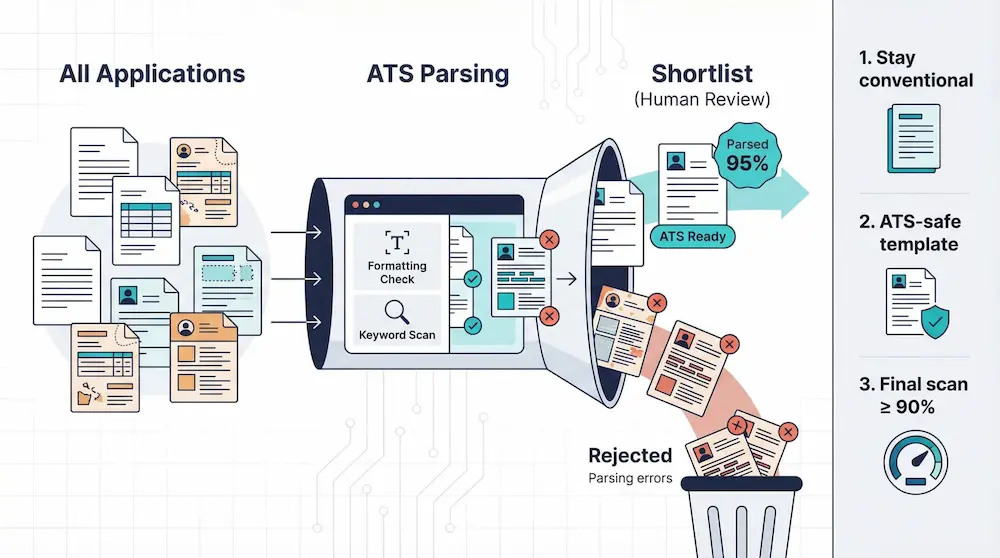
Copy the whole thing. Paste it into a blank Notepad file — nothing fancy, doesn’t need to be. If the order comes out scrambled, or a chunk just isn’t there anymore, that’s what the ATS sees too. Minus the part where you already know what it was supposed to say.
Watch for two things. Text gone missing usually means it was sitting inside a text box, a table, or a header the parser skipped over entirely. Text in the wrong order usually means the layout used columns or floating boxes, and the parser read it left to right, top to bottom, in whatever order that happened to produce.
Comes out clean both ways, formatting’s doing its job. Content’s its own conversation.
Three ATS Myths That Are Costing You Interviews
“Stuffing keywords beats the system.” Doesn’t. Not anymore. Parsers flag the unnatural repetition now, and on the rare one that misses it, the person reading it right after won’t.
“PDFs always fail the ATS.” Not really, no. Text-based PDFs parse fine most of the time. Image-based ones don’t — that’s the actual distinction hiding inside this myth, and people keep repeating it without checking which kind they’ve got.
“A creative, designed resume shows initiative.” To a design recruiter, sure, looking at an actual portfolio. To almost anyone else it’s a parsing risk with zero payoff. The ATS can’t read your sidebar, and the person in the maybe tab isn’t going hunting for information you buried inside a graphic.
Frequently Asked Questions About ATS Resumes
What is an ATS-friendly resume?
A resume built so parsing software can pull your information out correctly — plain layout, standard section headers, keywords that match the job description instead of paraphrasing it.
Do all companies use an ATS?
Most mid-size and large employers, yes. Smaller companies and some boutique firms still go through resumes by hand, so it depends who’s on the other end and how many applications they’re actually getting that week.
Can a genuinely well-written resume still fail the ATS?
Yes, more often than people expect. A strong resume with a two-column layout, a text box, or an image-based PDF can still get misread. Good writing doesn’t save a file the parser can’t open properly.
Should my resume look different for every platform I apply through?
Not entirely, no — just simple everywhere. Know the employer runs something specific, Naukri or Darwinbox, matching your profile data to your resume matters more than adjusting the design.
How long does a recruiter actually spend looking at my resume?
Around six to eight seconds on the first pass, based on the data out there. Not long. Long enough to catch a title and a last company. Not much past that, honestly.
Does font choice really make a difference to an ATS?
Less than people assume, as long as it’s a standard one. The bigger risk is size and decorative styling — small print, script fonts, anything the parser has to work to interpret at all.
Will a career gap trip up the ATS itself?
No. An ATS parses dates, it doesn’t judge them. A gap becomes a human question later, in the interview — not a parsing problem here, at this stage.
Is it worth using a resume template from Word or Canva?
Word templates are usually fine, single-column ones anyway. Canva’s the riskier bet — built to look good, not to export as clean, parseable text. That’s exactly where things tend to fall apart.